28 Nov 2025
12 min read

How to run @mediapipe/task-vision in a web worker

MediaPipe's Pose Landmarker (or other models/tasks by MediaPipe) is heavy and often blocks the main thread during initialization. However, we can offload initialization and prediction to a web worker to keep the main thread unblocked and responsive.

Mediapipe + Web Workers. Image created by the Ankit Kumar. Mediapipe logo © Google.Mediapipe + Web Workers. Image created by the Ankit Kumar. Mediapipe logo © Google.

Setting up the development environment

First, we'll set up our environment using vite and vanilla js. You can also find all the source code in my GitHub repository, which includes examples of using MediaPipe in a web worker in different frameworks.

Create a new Vite project:

bash
npm create vite@latest

Then follow the prompts to setup the project.

Running MediaPipe in the main thread

Before running MediaPipe's PoseLandmarker task in a web worker, we'll run it directly on the main thread. If you already know how to run MediaPipe on the main thread, you can skip to Running MediaPipe in a web worker.

Remove the boilerplate code and then add the following import in main.js:

main.js
import * as $mediapipe from "https://cdn.jsdelivr.net/npm/@mediapipe/[email protected]/+esm";

This will load all exports from @mediapipe/tasks-vision and places them under the $mediapipe namespace.

Note: You can use any name for the namespace, such as vision, mp anything else. I used $mediapipe because it looks nice. ;)

Next, we'll initialize MediaPipe's PoseLandmarker:

main.js
1
let poseLandmarker = null;
2
3
async function initializeMediapipePoseLandmarker() {
4
const vision = await $mediapipe.FilesetResolver.forVisionTasks(
5
"https://cdn.jsdelivr.net/npm/@mediapipe/tasks-vision/wasm",
6
);
7
8
poseLandmarker = await $mediapipe.PoseLandmarker.createFromModelPath(
9
vision,
10
"https://storage.googleapis.com/mediapipe-models/pose_landmarker/pose_landmarker_lite/float16/1/pose_landmarker_lite.task",
11
);
12
13
await poseLandmarker.setOptions({
14
runningMode: "VIDEO",
15
});
16
}

Once initialized, we need a function to run pose detection:

main.js
1
async function detectPose(imageOrVideoElement) {
2
if (!poseLandmarker) {
3
throw new Error("PoseLandmarker is not initialized");
4
}
5
6
const timestamp = performance.now();
7
return new Promise((resolve) => {
8
poseLandmarker.detectForVideo(imageOrVideoElement, timestamp, (result) => {
9
resolve(result);
10
});
11
});
12
}

We need additional code to setup the camera, video and a button to start the pose detection.

Add a video element and a button element in index.html as follows:

index.html
1
<!-- Important: we will use `video` id to grab video element -->
2
<video id="video" autoplay muted playinline height="300px" width="530px"></video>
3
4
<!-- Important: we will use `start` id to grab the button-->
5
<button id="start">Start</button>

Finally, we need to add four functions:

  1. setupDrawingTools: This will setup the canvas and DrawingUtils, a helper class to draw pose landmarker.

  2. drawLandmarks: To draw the landmarker.

  3. loop: To run pose detection in a loop.

  4. initializeVideoAndStartPoseDetection: To initialize the video and start pose detection.

main.js
1
let canvas;
2
let ctx;
3
let drawingUtils;
4
5
function setupDrawingTools() {
6
canvas = document.createElement("canvas");
7
8
canvas.style.position = "absolute";
9
canvas.style.zIndex = 100;
10
canvas.style.top = "0";
11
canvas.style.left = "0";
12
ctx = canvas.getContext("2d");
13
document.body.appendChild(canvas);
14
drawingUtils = new $mediapipe.DrawingUtils(ctx);
15
}
16
17
18
function drawLandmarks(result, video) {
19
canvas.width = video.clientWidth;
20
canvas.height = video.clientHeight;
21
ctx.clearRect(0, 0, canvas.width, canvas.height);
22
23
// Draw pose landmarks.
24
for (const landmark of result.landmarks) {
25
drawingUtils.drawLandmarks(landmark, {
26
radius: (data) =>
27
$mediapipe.DrawingUtils.lerp(data.from.z, -0.15, 0.1, 5, 1),
28
});
29
drawingUtils.drawConnectors(
30
landmark,
31
$mediapipe.PoseLandmarker.POSE_CONNECTIONS,
32
);
33
}
34
}
35
36
async function loop(video) {
37
try {
38
const result = await detectPose(video);
39
drawLandmarks(result, video);
40
} catch (error) {
41
console.error("Error detecting pose:", error);
42
}
43
44
requestAnimationFrame(() => loop(video));
45
}
46
47
async function initializeVideoAndStartPoseDetection() {
48
let stream;
49
let video = document.getElementById("video");
50
51
// Requesting camera and passing stream to video element
52
try {
53
stream = await navigator.mediaDevices.getUserMedia({ video: true });
54
video.srcObject = stream;
55
} catch (error) {
56
console.error("Error getting camera stream:", error);
57
return;
58
}
59
60
try {
61
await initializeMediapipePoseLandmarker();
62
} catch (error) {
63
console.error("Error initializing mediapipe pose landmarker:", error);
64
return;
65
}
66
67
setupDrawingTools();
68
69
if (video.readyState < 2) {
70
/**
71
* If video is not ready then wait for it to be ready.
72
*/
73
await new Promise((resolve) => {
74
video.addEventListener("canplay", resolve);
75
76
// A fallback, in case we is ready but didn't fire `canplay` event
77
setTimeout(resolve, 5_000);
78
});
79
}
80
81
loop(video);
82
}
83
84
document
85
.getElementById("start")
86
.addEventListener("click", initializeVideoAndStartPoseDetection);

Note: The code is only for demonstration purposes, it shouldn't be used as-is in production.

At this point, if everything is setup correctly, you'll see a button with "Start" label. Upon clicking, it will prompt for camera access, and once permission is granted, the Pose Landmarker will run.

Wonderful. Now, let's move on to the interesting part run the Pose Landmarker in a web worker.

Running MediaPipe in a web worker

Before we start, we need to understand the following things:

  1. Web workers run in a different thread, hence they need to be in a separate file.

  2. Communication between workers and the main threads is done via messages. Both sides send their messages using postMessage() and respond to the messages via the onmessage event handler.

  3. You can't directly manipulate DOM from inside a worker, the window object is not available.

This means we need to create a new file and put the initialization and detection code in it. In addition, we cannot send the video element to the worker. Instead, we need to send a string or an object, or an ImageBitmap.

Let's start with creating a new file in the public directory called poselandmarker.worker.js.

poselandmarker.worker.js
1
import * as $mediapipe from "https://cdn.jsdelivr.net/npm/@mediapipe/[email protected]/+esm";
2
3
let poseLandmarker = null;
4
5
async function initializeMediapipePoseLandmarker() {
6
const vision = await $mediapipe.FilesetResolver.forVisionTasks(
7
"https://cdn.jsdelivr.net/npm/@mediapipe/tasks-vision/wasm",
8
);
9
10
poseLandmarker = await $mediapipe.PoseLandmarker.createFromModelPath(
11
vision,
12
"https://storage.googleapis.com/mediapipe-models/pose_landmarker/pose_landmarker_lite/float16/1/pose_landmarker_lite.task",
13
);
14
15
await poseLandmarker.setOptions({
16
runningMode: "VIDEO",
17
});
18
}
19
20
/**
21
* Detecting the pose.
22
*/
23
async function detectPose(bitmapImage) {
24
if (!poseLandmarker) {
25
throw new Error("PoseLandmarker is not initialized");
26
}
27
28
console.log("Worker data received", bitmapImage);
29
30
const timestamp = performance.now();
31
return new Promise((resolve) => {
32
poseLandmarker.detectForVideo(bitmapImage, timestamp, (result) => {
33
resolve(result);
34
});
35
});
36
}

As we learned, web workers communicate with the main thread through messages, so we'll setup messages for handling communication.

poselandmarker.worker.js
1
self.onmessage = async (event) => {
2
const { type, payload } = event.data;
3
4
if (type === "init") {
5
await initializeMediapipePoseLandmarker();
6
self.postMessage({
7
type: "init",
8
payload: {
9
isSuccess: true,
10
},
11
});
12
return;
13
}
14
15
if (type === "detect") {
16
const result = await detectPose(payload.image);
17
self.postMessage({ type: "detect", payload: { result } });
18
}
19
};

After this, we need to do some changes in our loop and initializeVideoAndStartPoseDetection functions that we have in main.js. Refer to the highlighted code below.

main.js
1
async function loop(worker, video) {
2
try {
3
const image = await createImageBitmap(video); // creating image bitmap from video.
4
const result = await new Promise((resolve) => {
5
worker.onmessage = (event) => {
6
const { type, payload } = event.data;
7
if (type === "detect") {
8
resolve(payload.result);
9
}
10
};
11
12
worker.postMessage({
13
type: "detect",
14
payload: { image },
15
});
16
});
17
image.close();
18
drawLandmarks(result, video);
19
} catch (error) {
20
console.error("Error detecting pose:", error);
21
}
22
23
requestAnimationFrame(() => loop(worker, video));
24
}
25
26
27
async function initializeVideoAndStartPoseDetection() {
28
let stream;
29
let video = document.getElementById("video");
30
31
try {
32
stream = await navigator.mediaDevices.getUserMedia({ video: true });
33
video.srcObject = stream;
34
} catch (error) {
35
console.error("Error getting camera stream:", error);
36
return;
37
}
38
39
// Creating a web worker.
40
const worker = new Worker("/poselandmarker.worker.js");
41
42
try {
43
await new Promise((resolve, reject) => {
44
worker.onmessage = (event) => {
45
const { type, payload } = event.data;
46
if (
47
type === "init" &&
48
typeof payload === "object" &&
49
payload.isSuccess
50
) {
51
resolve("MediaPipe initialized");
52
}
53
};
54
worker.postMessage({ type: "init" });
55
});
56
} catch (error) {
57
console.error("Error initializing mediapipe pose landmarker:", error);
58
return;
59
}
60
61
setupDrawingTools();
62
63
if (video.readyState < 2) {
64
await new Promise((resolve) => {
65
video.addEventListener("canplay", resolve);
66
setTimeout(resolve, 5_000);
67
});
68
}
69
70
loop(worker, video);
71
}

However, when we run the code, we will see the following error.

Cannot use import statement outside a moduleCannot use import statement outside a module

Well, we know that in our poselandmarker.worker.js file, we have used import statement to import MediaPipe Task Vision module. However import is not allowed in classic web worker.

To fix this, we can try something else, in initializeVideoAndStartPoseDetection at line 40, where we are creating worker we can pass a second option:

main.js
const worker = new Worker("/poselandmarker.worker.js", { type: "module" });

But if we try this we will get a different error:
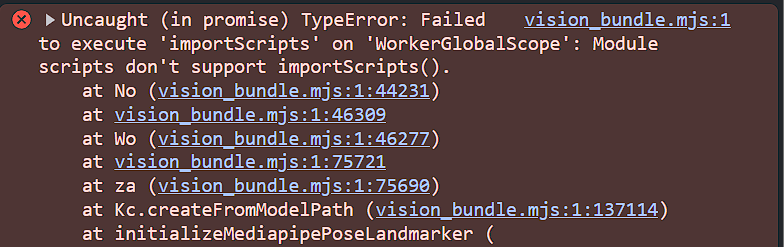
Failed to execute 'importScripts' on 'WorkerGlobalScope'Failed to execute 'importScripts' on 'WorkerGlobalScope'

This means we are using importScripts somewhere to import a script. However, we are not using it anywhere in our worker file. After digging @mediapipe/task-vision, we'll find it uses importScripts to load necessary files if importScripts is defined.
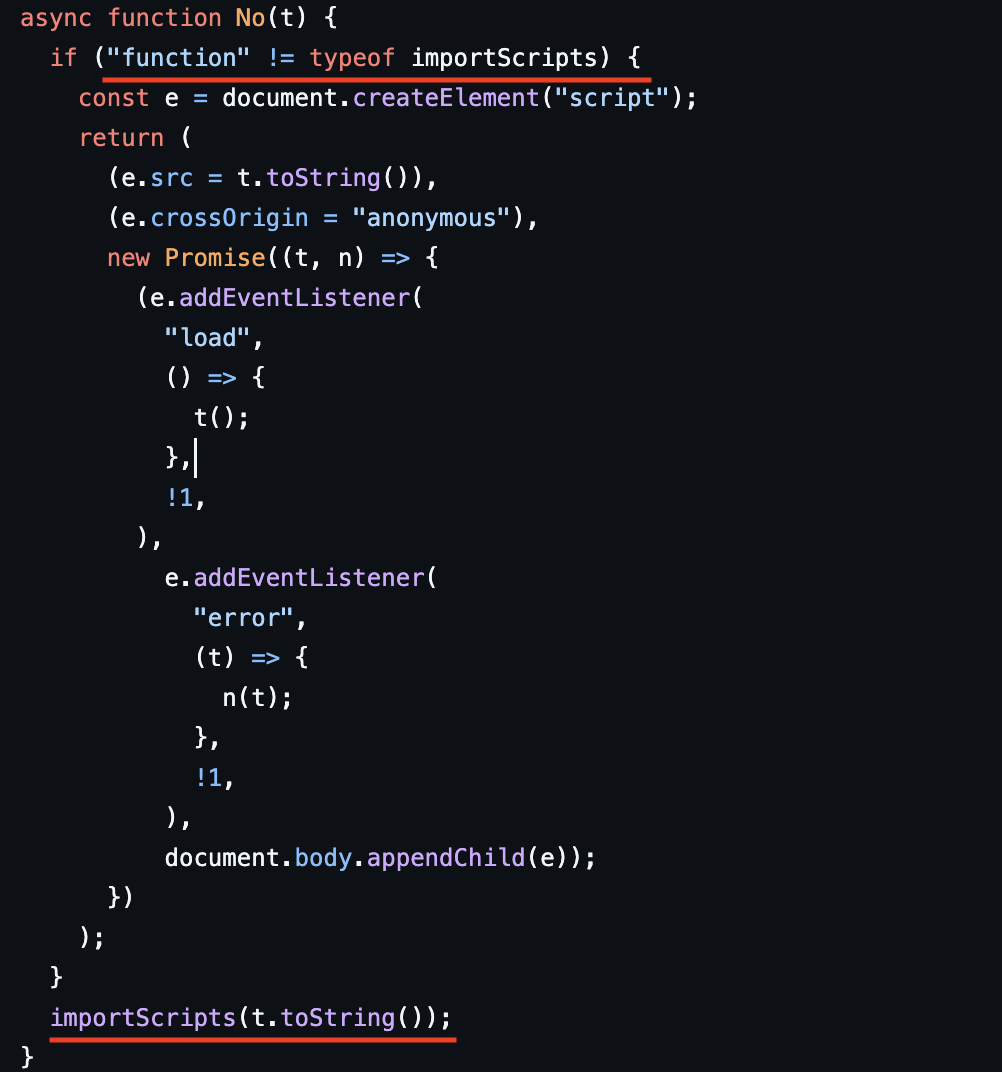
@mediapipe/task-vision uses importScripts to load scripts@mediapipe/task-vision uses importScripts to load scripts

This means we need to run the worker in the classic mode.

So, how do we fix the problem? The only part that stopping us from using @mediapipe/task-vision in classic mode are these lines at the end of the file:
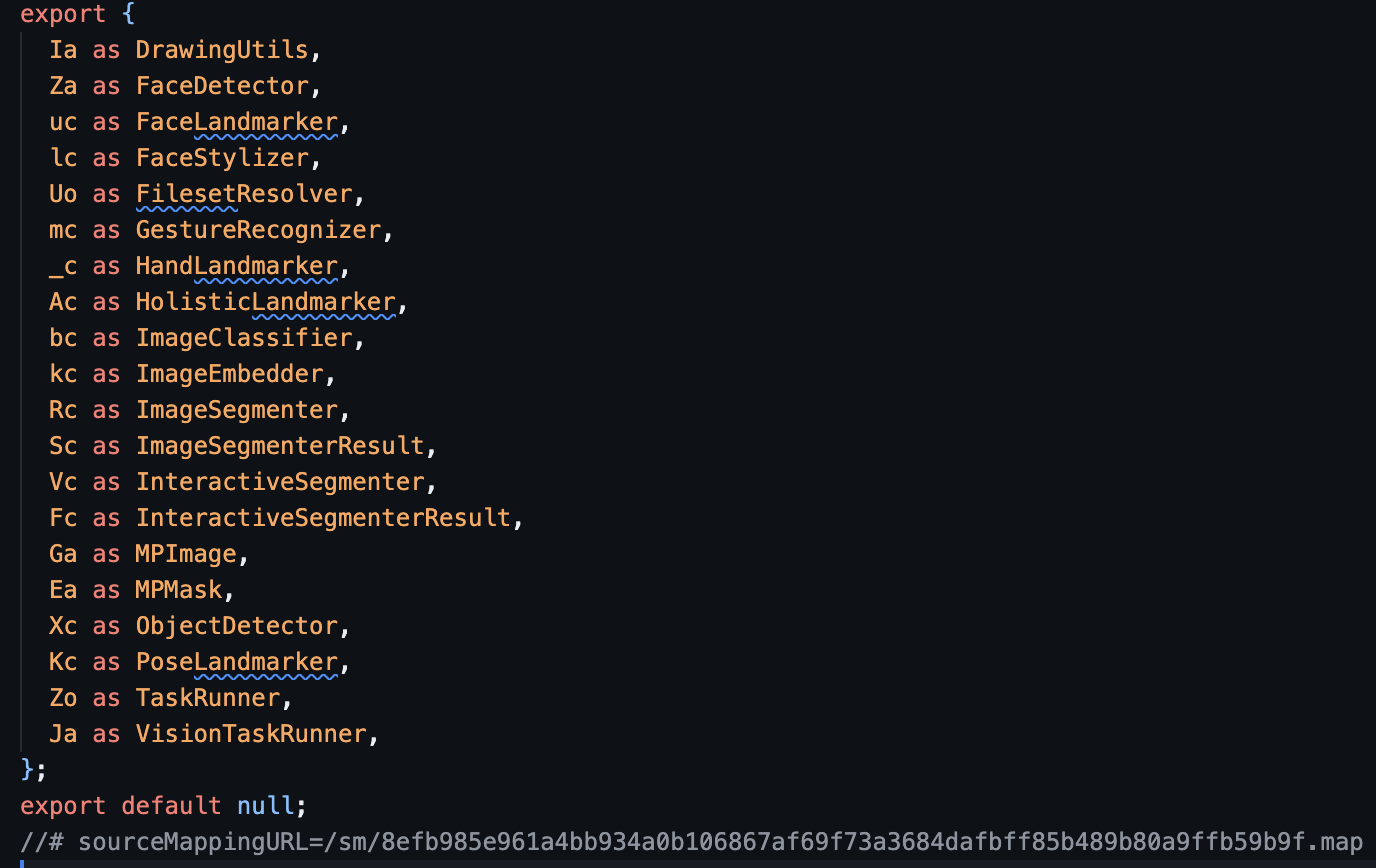
Methods exported by @mediapipe/tasks-visionMethods exported by @mediapipe/tasks-vision

If we remove these lines, and then use importScripts in poselandmarker.worker.js, we can fix the problem.

So, we need to download the js from https://cdn.jsdelivr.net/npm/@mediapipe/[email protected]/+esm and save it as mediapipe.js into public directory. Then go to the end of the file and replace the export with this:

mediapipe.js
1
const $mediapipe = {
2
DrawingUtils: Ia,
3
FaceDetector: Za,
4
FaceLandmarker: uc,
5
FaceStylizer: lc,
6
FilesetResolver: Uo,
7
GestureRecognizer: mc,
8
HandLandmarker: _c,
9
HolisticLandmarker: Ac,
10
ImageClassifier: bc,
11
ImageEmbedder: kc,
12
ImageSegmenter: Rc,
13
ImageSegmenterResult: Sc,
14
InteractiveSegmenter: Vc,
15
InteractiveSegmenterResult: Fc,
16
MPImage: Ga,
17
MPMask: Ea,
18
ObjectDetector: Xc,
19
PoseLandmarker: Kc,
20
TaskRunner: Zo,
21
VisionTaskRunner: Ja,
22
};

Note: The variable name is important, in this case we are using $mediapipe, because when we load this file via importScipts, all exported members are accessible through $mediapipe. So make sure the constant name matches the name you are using inside the web worker.

For simplicity, you can copy the code from here.

Next, we will use importScripts to import the mediapipe.js file in poselandmarker.worker.js, and revert the changes we made in initializeVideoAndStartPoseDetection.

poselandmarker.worker.js
importScripts('/mediapipe.js');
let poseLandmarker = null;
//... rest of the code
main.js
const worker = new Worker("/poselandmarker.worker.js");
//... rest of the code.

Congratulations! You have successfully implemented MediaPipe Pose Landmarker in a web worker.

Conclusion

This approach is a bit of a hack, but it provides a simple and effective solution for running MediaPipe Pose Landmarker in a web worker.

The major advantage is that the Pose Landmarker runs entirely in a web worker, leaving the main thread free to handle the UI.

  1. Complete implementation of MediaPipe Pose Landmarker in vanilla JS.

  2. Complete implementation of MediaPipe Pose Landmarker in a web worker.

  3. All example implementation of MediaPipe Pose Landmarker.

  4. Demo.

Copyright © 2022-2025, Ankit Kumar